
CHROME EXTENSION
Your merge queue, inside GitHub
See each PR's place in the queue and what's holding it up, right where you review code.
Free with every MergeRamp plan. Uses your MergeRamp sign-in.
Two places it shows up
Nothing new to learn. It adds MergeRamp to GitHub pages your team already uses.
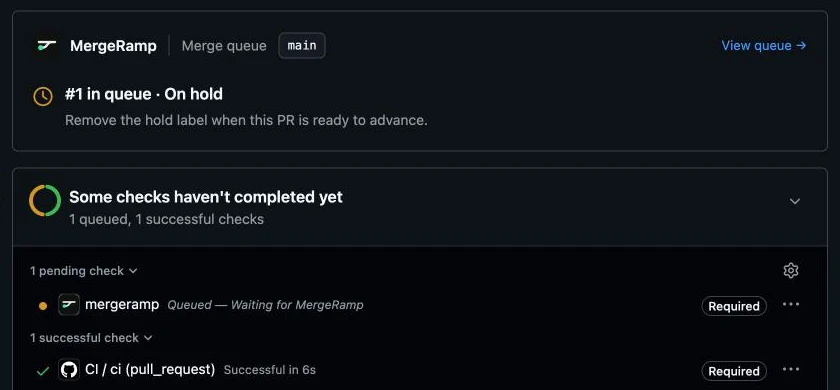
On every pull request
A status card above GitHub's checks tells you where the PR stands in the queue.
- Queue position and progress
- What's blocking it, and the next step
- View queue jumps to the whole line
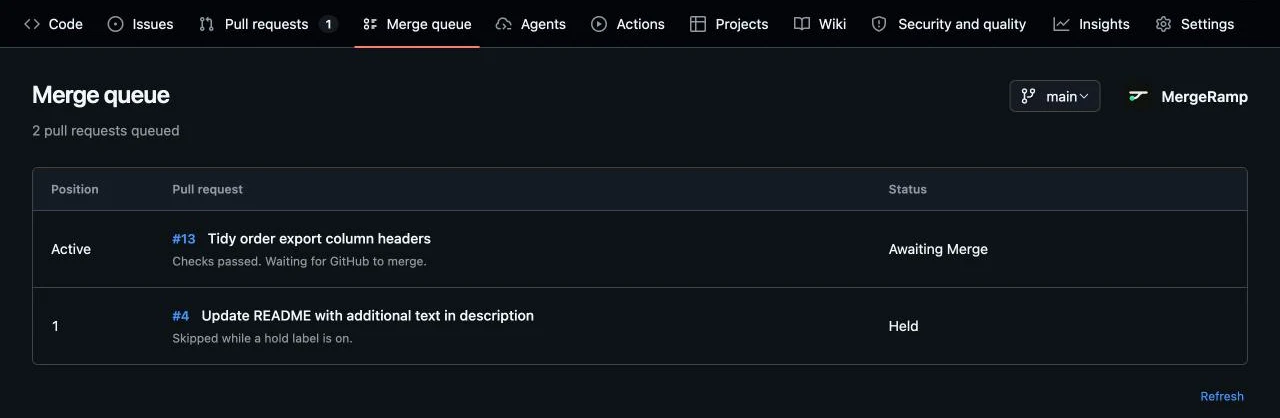
In your repository's navigation
A Merge queue tab lists every queued PR for a branch, with the active one first.
- Switch between main and release branches
- Holds and blockers at a glance
- Open any PR from the list
Know why a PR is waiting
Every status comes with a reason and a next step, so nobody has to ask in Slack.
- QUEUED
In line, waiting for its turn.
- CHECKING
At the front. Updated with main, CI running.
- WAITING FOR MERGE
Checks passed. GitHub merges it next.
- ON HOLD
Skipped while a hold label is on. Remove it to advance.
- WAITING FOR APPROVAL
Waiting on a review your branch rules require.
- CHECKS FAILED
Fix the failing checks before this PR can advance.
Set up in a minute
Add to Chrome
Install it from the Chrome Web Store.
Sign in to MergeRamp
In the same Chrome profile. There's no separate account.
Open a repository on GitHub
The Merge queue tab and PR cards appear.
New to MergeRamp?
The extension shows the queues in your MergeRamp workspace. MergeRamp is a merge queue for the GitHub Team plan: turn on auto-merge, and it tests each PR on the latest main before GitHub merges it.
No card needed. Free for up to 5 committers, 14-day trial for larger teams.
Questions
Does it cost anything?
No. The extension is free on every MergeRamp plan, including Free. It shows the queues in your MergeRamp workspace.
Which browsers does it work in?
Chrome and Chrome-based browsers, like Arc, on desktop. Install it from the Chrome Web Store, then sign in to MergeRamp in the same browser profile.
Does it change anything on GitHub?
No. PRs still join and leave the queue with GitHub's own auto-merge controls. The extension shows status and links.
What can it see?
It runs only on github.com. It reads the address of the page you're on to find the repository and pull request, and sends MergeRamp the repository name and PR number to look up its queue status. It doesn't send GitHub page content, read other sites or store a GitHub token. See the privacy policy for details.
More from MergeRamp
See all apps
MergeRamp
The merge queue itself: queues, repositories and billing.
Merge diagnostic
How often your PRs fall behind main, and what it costs. Free.
Capacity calculator
How many PRs a queue can handle with your CI. Free.
Extension docs
Install, sign in, and read each status on the PR card and Merge queue tab.